
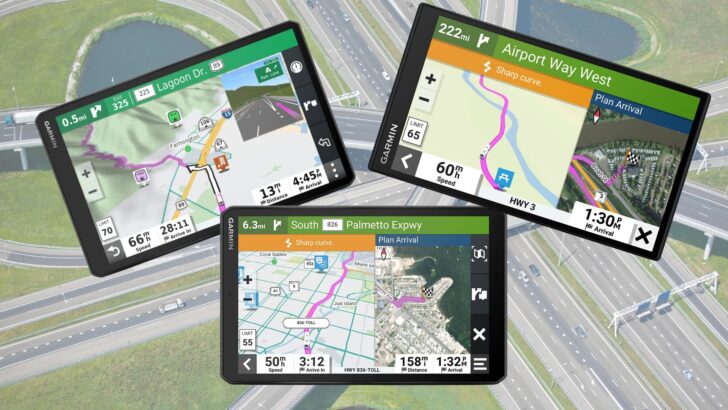
Garmin is a big name in the GPS world and the company has made a wide variety of GPS units and other products since 1989. In today’s post, we’re talking specifically about the Garmin RV GPS.
We’ve been on the road full-time for 20 years and we’ve used a lot of different navigating and trip-planning tools over the years.
We currently have a Garmin RV785 with a dash cam, (predecessor to the more current but very similar RV795). Do we love it? Do we hate it? Do we even use it?
Is a Garmin RV GPS unit fantastic and well worth buying or are there better (and cheaper) alternatives?
Let’s take a look at the pros and cons of navigating our RV travels with the assistance of a Garmin RV GPS unit.
- 1) What Is a Garmin RV GPS?
- 2) What Does a Garmin RV GPS Do?
-
3)
Pros and Cons of a Garmin RV GPS
-
3.1)
Pros/Love
- 3.1.1) Keeps Other Devices Free
- 3.1.2) Clear, Bright Screen
- 3.1.3) Good Viewing Angle
- 3.1.4) User Friendly
- 3.1.5) Campground Database Is Great
- 3.1.6) RV-Specific Features Are Good (and Bad)
- 3.1.7) Portability
- 3.1.8) Ability to Set Maximum Travel Speed
- 3.1.9) Battery Life
- 3.1.10) Wireless Connectivity
- 3.2) Cons/Hate
-
3.1)
Pros/Love
- 4) Would We Recommend a Garmin RV GPS?
- 5) Is a Garmin RV GPS Worth It?
- 6) What Are Some Good Alternatives to a Dedicated GPS Unit?
- 7) Have You Used a Garmin RV GPS?
- 8) Free RVing Tips, Tricks, Reviews, Giveaways & More
What Is a Garmin RV GPS?
Garmin’s RV GPS is a dedicated unit that mounts to your RV’s dash that’s designed to provide RV-specific navigation features.
Garmin offers several different RV-specific GPS units. They offer similar features, and we’ll provide some specific details about them below.
For now, here’s an overview of the various Garmin RV GPS units and how they differ. (Spoiler Alert: The primary differences are in screen size & resolution, and battery life… which isn’t actually that important since they’re all designed to be plugged into 12-volt power.)
Garmin RV 795
Garmin says this is the unit for you if you want a 7-inch (1024 x 600 pixels) display with custom routing and aerial views of your campground in an easy-to-use navigational package.
This model will provide up to 30 minutes of battery life on its internal battery.

- IN THE BOX: 1x Garmin RV 795 GPS Navigator, 1x vehicle suction cup mount, 1x traffic receiver/vehicle power cable, 1x CLA adapter, 1 x Wearable4U...
- Large 7” RV navigator offers a bright, high-resolution touchscreen to easily view your route and map updates of North America (With map coverage of...

Garmin RV 795 with Dash Cam
Essentially the same unit as the model noted above but with a built-in dash cam and up to 1 hour of battery life.
The features of both of these RV 795 units are discussed in more detail below.

- IN THE BOX: 1x Garmin RVcam 795 Navigator, 1x Vehicle suction cup mount, 1x Pre-installed 16 GB microSD card, 1x USB-C vehicle power cable with 12...
- BUILT-IN DASH CAM: The integrated camera continually records 1080p HD video with a 140-degree field of view and automatically saves video of...
Garmin RV 895
This model of the Garmin RV GPS has an 8-inch (1280 x 800 pixels) display in addition to the Garmin navigational features (noted in the next section).
With this unit, you’ll get up to 2 hours of battery life.

- IN THE BOX: 1x Garmin RV 895 GPS Navigator, 1x vehicle suction cup mount, 1x traffic receiver/vehicle power cable, 1x CLA adapter, 1 x Wearable4U...
- Large 8” RV navigator offers a bright, high-resolution touchscreen to easily view your route and map updates of North America (With map coverage of...
Garmin RV 1090
This RV GPS unit will give you a 10-inch (1280 x 800 pixels) display, and up to 2 hours of battery life in addition to the features noted in the next section.
What Does a Garmin RV GPS Do?
Garmin’s dedicated RV GPS units offer a wide variety of features to help you to navigate your travels.
Again, we want to note that we have the Garmin RV 785 + dash cam which compares most closely to the updated model, (the RV 795 + Dash Cam).
We’ll share the general features and claims of the Garmin RV GPS units with you here, and then we’ll talk about how ours has performed based on our experience.
Most people are familiar with what a GPS does in general, so let’s talk about what an RV-specific GPS from Garmin has to offer:
Custom Routing
You can customize your travel route based on the size and weight of your RV.
Warnings
The unit will give you advanced warnings for upcoming “events” such as sharp curves, low overpasses, and steep grades.
Satellite Imagery
Garmin’s satellite imagery mode, known as “BirdsEye”, offers a satellite view of your campsite to help you navigate your way in.
Recommendations
A Garmin RV GPS will show you some of the most popular places along your travel route as well as recommended activities in the vicinity of your camping destination.
Campground Directory
Garmin RV-specific units offer a preloaded directory of RV parks and campgrounds as well as ratings from travelers who use TripAdvisor.
Wireless Updates
You can update Garmin’s software wirelessly to keep the maps up to date, meaning that you don’t need to connect the unit to a computer for updates.
Garmin lets you know when a new update is available with a notification on your unit’s screen.
Speak-to-GPS
You can ask your GPS for directions by speaking aloud.
Bluetooth Technology
If you have a compatible smartphone, you can sync it with your Garmin RV GPS via Bluetooth for hands-free calling.
Choice of Screen Size
Garmin’s RV GPS units are offered in three different screen sizes – 7″, 8″, or 10″.
Optional Built-In Dash Cam
You can opt for your Garmin RV GPS to come with a built-in dash cam, but you’ll pay about $150 for that option.
In our case, we opted for the unit with the dash cam. One note about that… we can’t actually use our dashcam due to the slight downward angle of our dashboard. With the suction cup attached to one of those smooth discs you stick onto the dashboard, the mount on the GPS doesn’t allow it to angle back far enough for the cam to see the road.
The design of the suction cup arm makes it apparent that it was really intended to attach to a windshield. As with many RVs, our windshield is WAY too far away to make that a practical alternative. So we’re unable to use the dash cam.
Pros and Cons of a Garmin RV GPS
This section could also be entitled “What We Love and Don’t Love (Hate) About Our Garmin RV GPS.”
In other words, this is going to be our take based on our real-life experience using our Garmin RV 785 with Dash Cam.
We’ll start with a long list of things we have appreciated about our Garmin unit.
Then we’ll share a short list of things we pretty much hate about it, followed by our thoughts on whether it’s been worth the expense, and if we’d buy it again… or not.
Pros/Love
Following are the benefits of our Garmin RV GPS unit and the things we’ve loved about having it.
Keeps Other Devices Free
Having a dedicated GPS device keeps our other devices (phone, tablet) free for other things.
Clear, Bright Screen
The screen is clear and bright in virtually all conditions, making it easy to use. We have the 7” screen and we’ve found it to be big enough for us. We haven’t regretted not getting a larger screen at all.
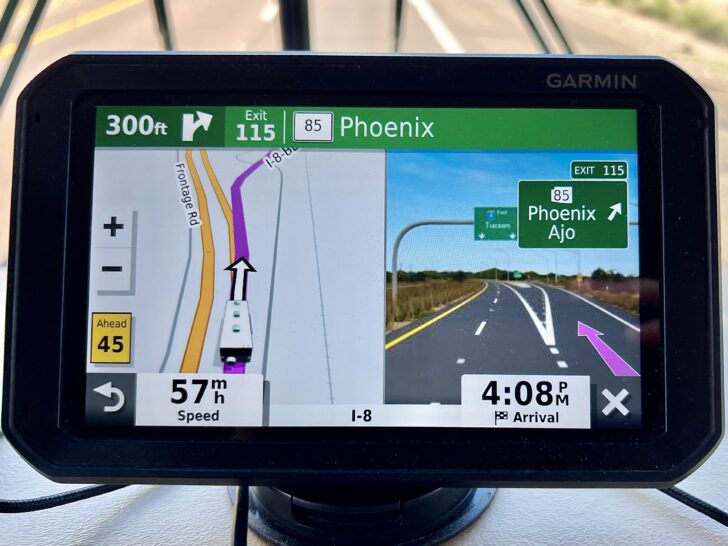
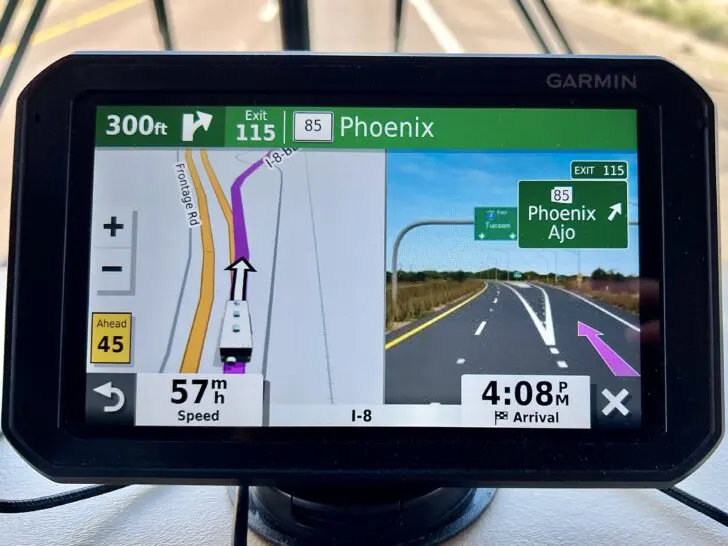
The 7″ screen of our Garmin 785 (now updated to the 795) is so good that we’ve never regretted not getting a larger screen.
Good Viewing Angle
The viewing angle on the screen is good as well, allowing both the driver and co-pilot/navigator to see it clearly.
User Friendly
The interface is generally very easy to use. We haven’t had any difficulty navigating the user interface.
Campground Database Is Great
The included database of RV Parks/campgrounds and other RV-related services makes finding your destination a snap.
We also love that it’s all local to the device, so no internet connection is needed to use it.
RV-Specific Features Are Good (and Bad)
The “RV” features provide peace of mind that we won’t encounter a low overpass or be overweight for a bridge… when it works. (More on that in the Cons/Hate section!)
Portability
It’s portable, so we can move it between the RV and the car anytime.
Also, when using it in the car, we can change the vehicle profile so it doesn’t have to use an RV-safe route.
Ability to Set Maximum Travel Speed
The vehicle profiles in our Garmin RV GPS include the ability to set our maximum speed.
We’ve found that this improves the accuracy of both the estimated travel time and the estimated time of arrival. This makes our Garmin more accurate at predicting travel time than Google Maps or Apple Maps, both of which assume we’ll drive the speed limit.
This is particularly handy when traveling on high-speed limit roads. We generally take a pretty relaxed pace, and rarely set the cruise control above 60 MPH on the Interstate. But on a 75 MPH-speed-limit highway (common out west), other navigation systems assume we’ll be traveling at 75 MPH.
Our Garmin knows we drive no more than 60 MPH the vast majority of the time, so its trip times are very accurate. That can be extra handy when we’re planning to be arriving not long before sunset. Google and Apple think those trips will be considerably faster than they actually are, and we’d end up arriving justafter sunset instead.
Battery Life
We always keep our GPS plugged into 12V power from the RV. But decent battery life means it doesn’t have to be plugged in all the time.
Good battery life is a desirable feature, so worthy of being in the “Pros” category.
Wireless Connectivity
We’ve appreciated the fact that our Garmin GPS connects to WiFi, making map & software updates easy to complete.
In the past, older units required the user to connect the GPS to a computer with a USB cable for updates, so this is a significant improvement.
Cons/Hate
And now for the things we’ve hated about our Garmin RV GPS — the things we would consider to be negative/undesirable.
Expensive
The Garmin RV-specific units are still expensive.
This is a negative for obvious reasons, but also because other options such as trip planning apps offer more features and guidance while still offering RV-safe routing (one of the main reasons to have an RV-specific GPS).
Garmin’s RV-Safe Routing Isn’t Great
We’ve found that the RV-safe routing of our Garmin RV 785 sometimes generates routes that add as much as 50-100 miles to the total trip, which is frequently unnecessary.
It often routes us around roads it detects as having an issue when in reality they don’t.
We’ve seen this first-hand many times when we’ve ignored a longer, suggested route because we already knew the shorter route was fine (no low overpasses or low weight bridges). Sure enough, the route it was trying to avoid was perfectly okay.
For this reason, we always double-check Google Maps before heading out of the way. Of course Google won’t know about low-weight bridges and low overpasses. So if youdo decide to ignore a suggested longer route from the Garmin, stay alert for height and weight limits (which you should be doing anyway!).


Our Garmin RV GPS has sometimes tried to reroute us by as much as 50-100 miles out of our way because it thought there was a road issue that didn’t actually exist. This is the single biggest “hate” aspect of our love/hate relationship with our Garmin.
Would We Recommend a Garmin RV GPS?
Based on our experience using the Garmin RV 785 for several years now, we wouldn’t recommend it as the sole source of navigation. Once we’ve checked the routing against Google or Apple maps at the start of our trip to be sure we aren’t being routed way out of the way (that they basically agree with the Garmin), we love it — large bright screen, clear directions, easy to follow. Fine.
But what about when Google or Apple maps completely disagree with the Garmin by 50-100 miles or more? How do you know you’re going out of the way for a valid reason if you can’t rely on the Garmin to really know when there’s a reason to take you on a longer route. You can’t. Which kind of defeats the purpose of RV-safe routing.
We think the CoPilot RV GPS app that you can use on a smartphone or tablet is a better choice. It has far fewer glitches with routing, has all the same RV-specific safety options, and is significantly less expensive to purchase at the outset.
We will note, however, that it does have an annual subscription, so that will add up over time. And it does tie up whatever device you’re using it on. And you need a mount for that device.
Is a Garmin RV GPS Worth It?
We don’t think that the Garmin is necessarily a waste of money. In fact, if you’re willing to put up with some of its limitations, it works quite well. And we still use it every time we drive because it’s such a great, easy-to-read display. We just can’t use its routing reliably without checking up on it first.
If your budget is tight and if you already have a phone or tablet that you can use as a dedicated navigation device when driving, why spend more than you need for an inferior routing experience?
Free alternatives like Google Maps and Apple Maps offer much better routing, but they lack any RV-specific features like vehicle height, weight, propane, etc.
However, if you already have a subscription to any of the RV Trip planners that include RV-safe GPS routing, you’re probably better off not spending the money on a Garmin.
What Are Some Good Alternatives to a Dedicated GPS Unit?
In addition to the CoPilot GPS app listed above, there are a couple of other excellent options to consider that also offer RV-specific features.
As a bonus, if you’re interested in either of them you can save money using the RVgeeks coupons provided.
RV Life PRO
RV Life Pro membership provides access to a suite of valuable tools (each one separately worth the cost of the whole package), including: RV Trip Wizard (trip planner); RV Safe GPS app (for...Show More RV Life Pro membership provides access to a suite of valuable tools (each one separately worth the cost of the whole package), including: RV Trip Wizard (trip planner); RV Safe GPS app (for RV-specific navigation); CampgroundReviews.com (user reviews of RV Parks & campgrounds); iRV2.com (community forums); RV Life Maintenance Tracker (maintenance schedule tracking), and RV Masterclass (excellent educational material for all RVers). Read Our Post All About The RV Life App Save 25% on your first annual subscription to RV Life PRO by clicking the button. The discount will be applied when you click through to the payment page. Show Less
RoadPass Digital (formerly ToGo RV)
Upgrade your RVing experience with Roadpass Plus. One annual subscription gets you access to Roadtrippers Plus (a comprehensive trip planner), Campendium (for finding free boondocking spots all...Show More Upgrade your RVing experience with Roadpass Plus. One annual subscription gets you access to Roadtrippers Plus (a comprehensive trip planner), Campendium (for finding free boondocking spots all over North America), OvernightRVParking.com (for finding free overnight RV parking spots), RV-Safe GPS (for RV-specific turn-by-turn navigation), and access to savings on RV Tires (save up to 45% on major brands). Save $10 on your subscription when you sign up using coupon code RVGEEKS.

Have You Used a Garmin RV GPS?
If you’ve used a Garmin dedicated RV GPS unit, we’d love to hear about your experience. Drop us a comment below.
Free RVing Tips, Tricks, Reviews, Giveaways & More
Subscribe to our daily newsletter! We’ve been full-time RVers for 20 years (!) and share everything we’ve learned about RVing in our daily blog posts. Join our online community to receive a wealth of great RVing knowledge delivered right to your inbox.
Whether this is your first time on the road or you’re a seasoned full-timer, you’ll love the wide range of RVing topics we cover. Don’t miss a single article or any of our famous RV gear Giveaways — Subscribe today!
Douglas
Monday 18th of March 2024
I, too, have experienced routing around roads that are safe rv roads. Also I have seen numerous times it wants to route me off on an exit then a u-turn and right back on the freeway where you just exited. No reason for it. Otherwise I agree with your assessment.
Mark L
Sunday 17th of March 2024
I have used the Garmin RV GPS (still using the 770) for several years and over 60,000 miles with mixed success. I never trust the Garmin GPS completely. I always check the route that it suggests against Google Maps and a paper Motor Carrier’s Road Atlas. If there is serious conflict in routes, the Road Atlas always wins. Google Maps is great for traffic and highlighting road closures, construction, and other issues that can impact travel. The Road Atlas clearly shows the routes that the commercial semi trucks can safely travel and is always available for a quick check (an no power or GPS signal is required to use it).
Garmin struggles to keep up with changes in road conditions (e.g., construction/closures) and its data on bridge heights and weights is always suspect. I added the POIs from lowclearances.com for bridges, which gives me more confidence in the bridge height data on the Garmin. The accuracy of the Canadian roads is also very suspect in the Garmin. Garmin struggled on our trip last summer to British Columbia and Vancouver Island with inaccurate routings, even trying to route us on a gravel forest road near Whistler BC. Garmin’s web-based process for reporting problems with their data is also very cumbersome and slow, as compared to Google Maps where data problems are quick and easy to submit and quickly reviewed/updated.
I subscribed to the CoPilot RV app on the Apple App Store a couple of years ago and attempted to use it without much success. The app was very buggy and inconsistent in operation and routing; support was virtually non-existent. The recent reviews on the App Store continue to highlight the same problems that I encountered with the app and new problems, as well. The app, IMHO, is a waste of money and time. Garmin, for all its issues, has better data and is more consistently right on routes than the CoPilot app. The Garmin also always works and software and map updates are regular and rarely cause any new issues with the device.
Jerry
Sunday 17th of March 2024
We have the RV890 which was expensive in Canada. We like the mag mount feature. We do not like the low battery life. It often cannot find addresses that readily pop up under Googlemaps but we do like it when it does know where it’s going.
Really would question the cost just to have a few rv features.
We often check it to Google maps and also we use RV life pro.
Ethan
Sunday 17th of March 2024
Among the advantages of using a Garmin device dedicated to RV, the measurements of my RV (height, for example) are fed in to help it find “supposedly” best routes to my destination. I use Goggle Maps on my iPhone to compare the best (and shorter) way to get there. There is one instance I wish that I listened to my Garmin when I drove my rig with a towed vehicle through one of the most treacherous routes towards Vancouver, BC, from northern Canada. My Garmin kept on insisting me to follow its way and I kept on ignoring it per Google Maps and an AAA map. I had to pull out to cool its brakes several times in turn stretching the traveling time arriving the campground in dark.
Bob
Sunday 17th of March 2024
We use the Garmin 1090. It allows me to alter the route. I can adjust the route and modify my choices. Works very well for roads that I know are good when Garmin may think other wise.